Consent logging: keep evidence of visitor choices (Pro & Agency)
If a regulator or auditor ever asks “can you prove this visitor consented?”, consent logging is your answer. It records every consent decision made on your banner into your own site’s database — timestamped, privacy-safe, and exportable. Available on the Pro and Agency plans.
What gets recorded
Each time a visitor makes a choice on the consent banner, one event is stored with:
| Field | Details |
|---|---|
| Date / time | When the choice was made (UTC) |
| Action | Accepted all, Declined all, Required only, or Custom (a per-category selection) |
| Services | Which consent services the decision covered |
| Page | The URL where the choice was made |
| Anonymized IP | IPv4 addresses have the last octet zeroed (e.g. 203.0.113.0); IPv6 addresses are truncated equivalently |
| Plugin version | Which CoreConsent version recorded the event |
Just as important is what’s not recorded: no full IP addresses, no user agents, no names, no identifiers of any kind. And nothing ever leaves your site — the log lives in a table in your own WordPress database. (This is the design that lets the log serve as consent evidence without becoming a personal-data liability itself.)
Turning it on
- Go to Settings → Consent logging and enable it.
- Set the retention period — records older than this many days are deleted automatically by a daily cleanup job. The default is 365 days.
- Save. Logging starts with the next consent decision on your site.
Reading the log
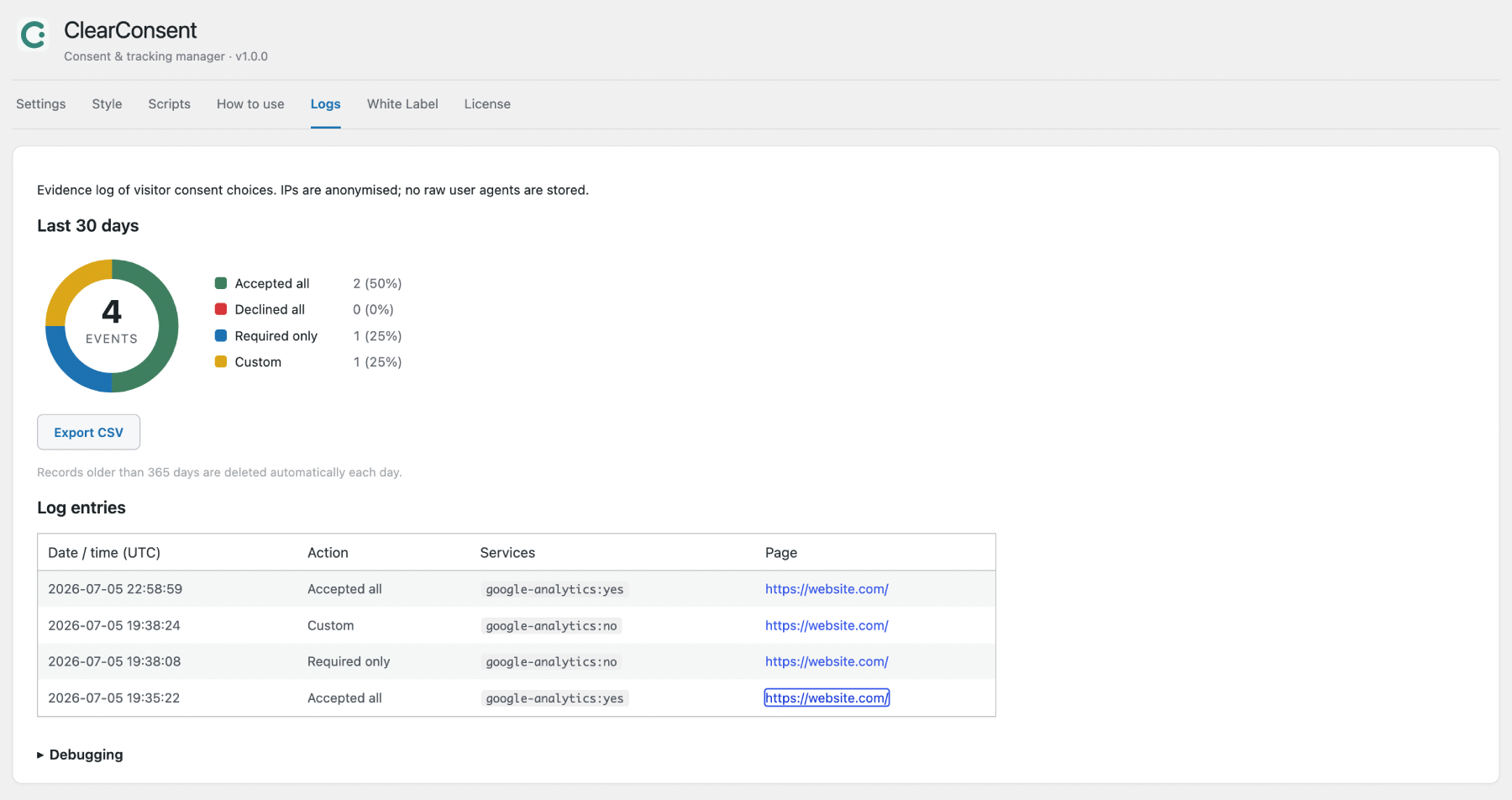
Open the Logs tab. You’ll see:
- Last 30 days — a donut chart breaking down decisions into Accepted all / Declined all / Required only / Custom, so you can see your consent rates at a glance.
- Daily trend — stacked bars of each day’s events (same colors as the donut) with a dashed line tracking the share of “Accepted all” per day. This is the chart to watch after changing your banner’s text, layout, or button set: if the dashed line moves after the change, your banner design moved it. Hover any bar segment for exact counts.
- (If your accept rate looks low, that’s often a prompt to revisit your banner copy or layout — see the Style tab.)
- Log entries — the full event table, paginated, newest first.
- Export CSV — downloads the log for offline analysis, sharing with counsel, or archiving before a retention cutoff.
Retention and cleanup
The retention setting isn’t just tidiness — data-minimization principles (GDPR Art. 5) expect you not to keep records longer than needed. The daily cleanup enforces whatever window you choose. If you need long-term archives, use Export CSV periodically and store the files under your own retention policy.
FAQ
Do I need visitor consent to keep this log? The log exists to demonstrate consent (the accountability obligation under GDPR Art. 7), contains only anonymized data, and is generally treated as a legitimate compliance record. As always for your specific situation, confirm with your privacy counsel.
Does logging slow down my site? No. Recording happens via a single lightweight background request after the visitor makes a choice — nothing runs on normal page views.
I enabled it but see “No consent events logged yet.” Events are only created when a visitor actively makes a choice. Visit your site in a private/incognito window, respond to the banner, and refresh the Logs tab.
What happens to the log if my Pro license lapses? The data stays in your database — nothing is deleted. Recording and the Logs tab resume when the license is active again.